# Types
Types are reusable rules for content. They decide how a record is edited, how it renders, and which behaviour follows it around the system.
Think of them as the cards in the Capell Library. A card has a name, a short description, a family, and a set of rules. The editor sees the plain name and description. Capell keeps the schema, renderer, cache settings, package hooks, and permissions behind it.
## Better Names
The database still stores these as types, layouts, sections, widgets, and package records. In the product and docs, clearer names help people choose the right thing:
| Product name | Technical shape | What it means |
| --------------- | ---------------------------- | --------------------------------------------------------------------------------- |
| Site blueprint | Site type | The high-level setup for a site: domains, languages, pages, settings, theme. |
| Page template | Page type | The rules for a page URL: editor fields, rendering, listing, sitemap, cache. |
| Visual theme | Theme type | The visual system: typography, colour, spacing, components, and artwork style. |
| Layout recipe | Layout | The page composition shell used by one or many pages. |
| Page section | Section type | A large content band, such as a hero, feature row, gallery, or CTA. |
| Widget | Element type | A reusable component placed inside a layout, such as breadcrumbs or latest pages. |
| Content block | ContentSections content type | Editable content used by sections and widgets. |
| Starter example | Demo package content | Seeded pages, layouts, widgets, images, and copy for learning or previews. |
| Visual style | Artwork or demo variation | A design treatment applied to the same content model. |
That vocabulary keeps the editor-facing model simple without hiding the fact that developers still register real Capell extension points underneath.
## Core Variations
Core types are quiet by design. They define structure and behaviour, not a finished brand.
| Variation | Family | Short description |
| -------------- | -------------- | ---------------------------------------------------------------------------- |
| Default | Page template | A flexible page for ordinary content, landing pages, and simple publishing. |
| Home | Page template | The main entry page for a site, usually excluded from listings. |
| Page not found | Page template | A fixed system page for missing URLs and not-found responses. |
| Maintenance | Page template | A fixed system page shown while a site or route is unavailable. |
| System | Page template | A protected page type for internal, generated, or non-editorial output. |
| Default | Site blueprint | The baseline site setup for domains, languages, pages, settings, and theme. |
| Default | Visual theme | The baseline theme record used when a site has no specialist theme. |
| Default | Layout recipe | A general-purpose layout for standard pages and content-led views. |
| Home | Layout recipe | A homepage layout for the main site entry point and high-level content. |
| Results | Layout recipe | A listing layout for search results, indexes, and grouped content. |
| System page | Layout recipe | A locked layout for fixed system pages that should not use the page builder. |
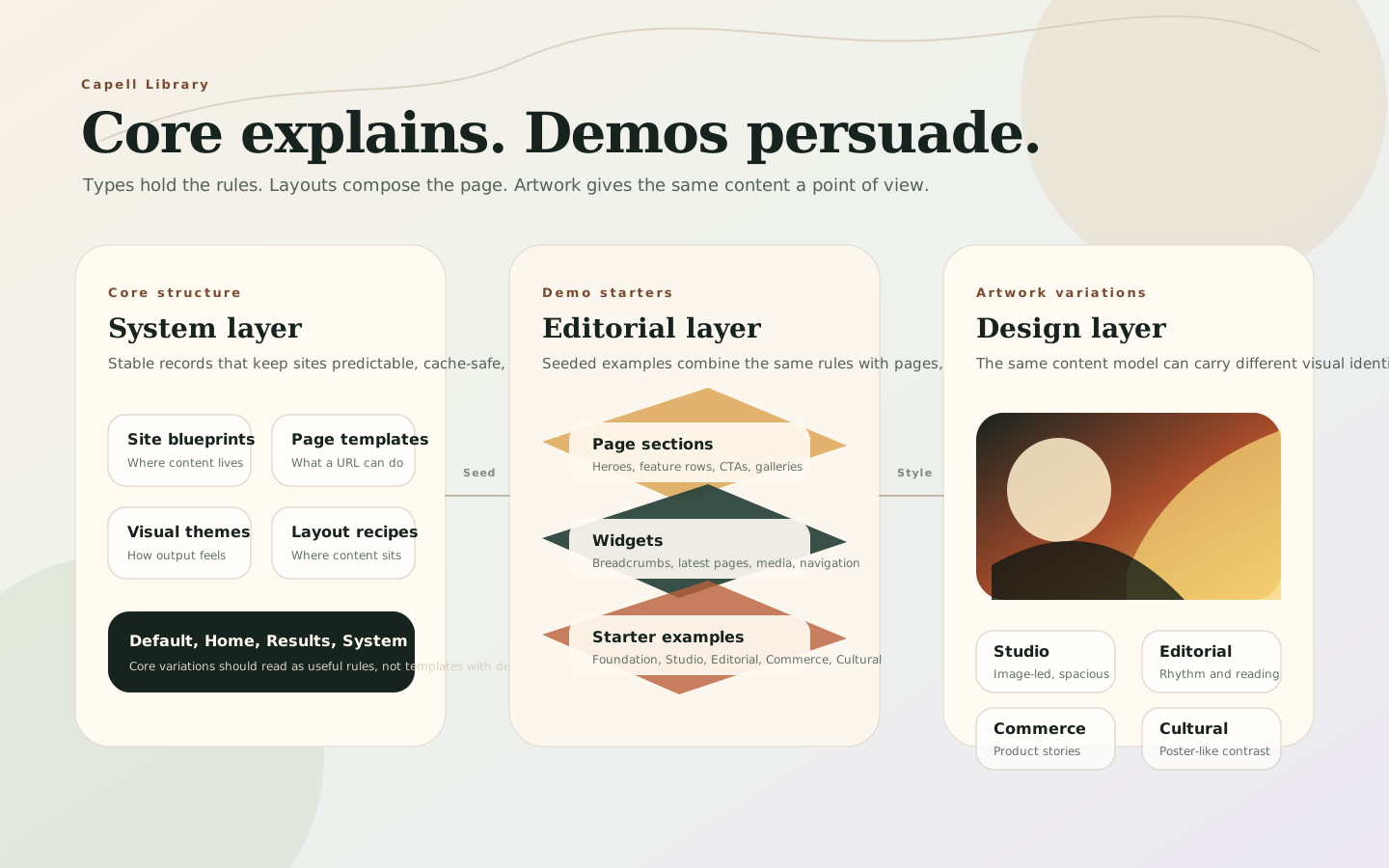
The important difference: a page template controls what a page is allowed to do. A layout recipe controls where page content appears. A visual theme controls how the finished page looks.
## Demo And Artwork Variations
Demo variations should prove range without changing the core mental model. They combine the same site blueprints, page templates, layout recipes, sections, and widgets with stronger visual direction.
Good demo families:
| Demo family | Use it for | Artwork direction |
| ----------- | ----------------------------------------- | ------------------------------------------------------------------ |
| Foundation | Plain CMS evaluation and product docs | Calm grids, neutral surfaces, clear type, low decoration. |
| Studio | Agencies, portfolios, architecture | Large image crops, measured whitespace, editorial serif accents. |
| Editorial | Blogs, magazines, publishing teams | Strong rhythm, article cards, pull quotes, collection-led artwork. |
| Commerce | Lifestyle, product storytelling, services | Warm product imagery, rounded details, clear CTAs, polished cards. |
| Cultural | Events, museums, exhibitions, programmes | High-contrast typography, poster-like crops, bold colour blocks. |
Core explains. Demos persuade. Artwork gives the same content a point of view.
## What Types Control
A type can change several parts of the system at once:
| Area | What the type can change |
| ------------------ | ------------------------------------------------------------------------------------------------------------------------- |
| Editor shape | Which configurator, required fields, asset choices, role restrictions, and package fields appear in admin. |
| Frontend rendering | Which Blade component, display component, cache time, cache frequency, and output behaviour should be used. |
| Content behaviour | Whether pages are accessible by URL, included in listings, included in sitemaps, or linked with previous/next navigation. |
| Reuse | Which widgets, page models, content structures, or content-sections surfaces can share the same setup. |
Choosing or creating a type changes the editing experience and the runtime behaviour for every record assigned to it.
## What Changes In The Editor
The page create form is the clearest first example. Changing the page template can change the editor fields and page behaviour. Changing the layout recipe controls the frontend composition used by that page.

 Type-specific fields can also appear in expandable sections or package-provided areas. A standard page might show summary and CTA fields. A specialist page template can expose richer structured fields through its configurator or package extenders.

 ## Type Configuration
The Types screen groups records by model family, such as pages, sites, themes, sections, and widgets. Each type has a unique key used by configuration, templates, URL generation, and package integrations.
For page templates, the frontend tab controls rendering and public behaviour. This is where a type can choose the page component, cache behaviour, URL accessibility, listing visibility, sitemap inclusion, previous/next linking, and whether editors may change the layout on pages of that type.
The admin tab controls the editor-facing side: configurator selection, icon, short description, allowed asset types, required fields, and role restrictions. Packages can add more fields through schema extenders without replacing the whole type form.
## Extension Points
Developers and packages register types through Capell extension points. Core page templates, package page templates, widgets, page sections, and content blocks all use the same idea: give a model a reusable named configuration that can be discovered, edited, and rendered consistently.
Use [How Capell works](how-capell-works.md#extension-points) for the high-level map, and [Extending Capell](../../packages/core/docs/extending-capell.md#2-page-types-and-component-registration) for developer registration details.
## Type Configuration
The Types screen groups records by model family, such as pages, sites, themes, sections, and widgets. Each type has a unique key used by configuration, templates, URL generation, and package integrations.
For page templates, the frontend tab controls rendering and public behaviour. This is where a type can choose the page component, cache behaviour, URL accessibility, listing visibility, sitemap inclusion, previous/next linking, and whether editors may change the layout on pages of that type.
The admin tab controls the editor-facing side: configurator selection, icon, short description, allowed asset types, required fields, and role restrictions. Packages can add more fields through schema extenders without replacing the whole type form.
## Extension Points
Developers and packages register types through Capell extension points. Core page templates, package page templates, widgets, page sections, and content blocks all use the same idea: give a model a reusable named configuration that can be discovered, edited, and rendered consistently.
Use [How Capell works](how-capell-works.md#extension-points) for the high-level map, and [Extending Capell](../../packages/core/docs/extending-capell.md#2-page-types-and-component-registration) for developer registration details.