
Architecture Diagrams
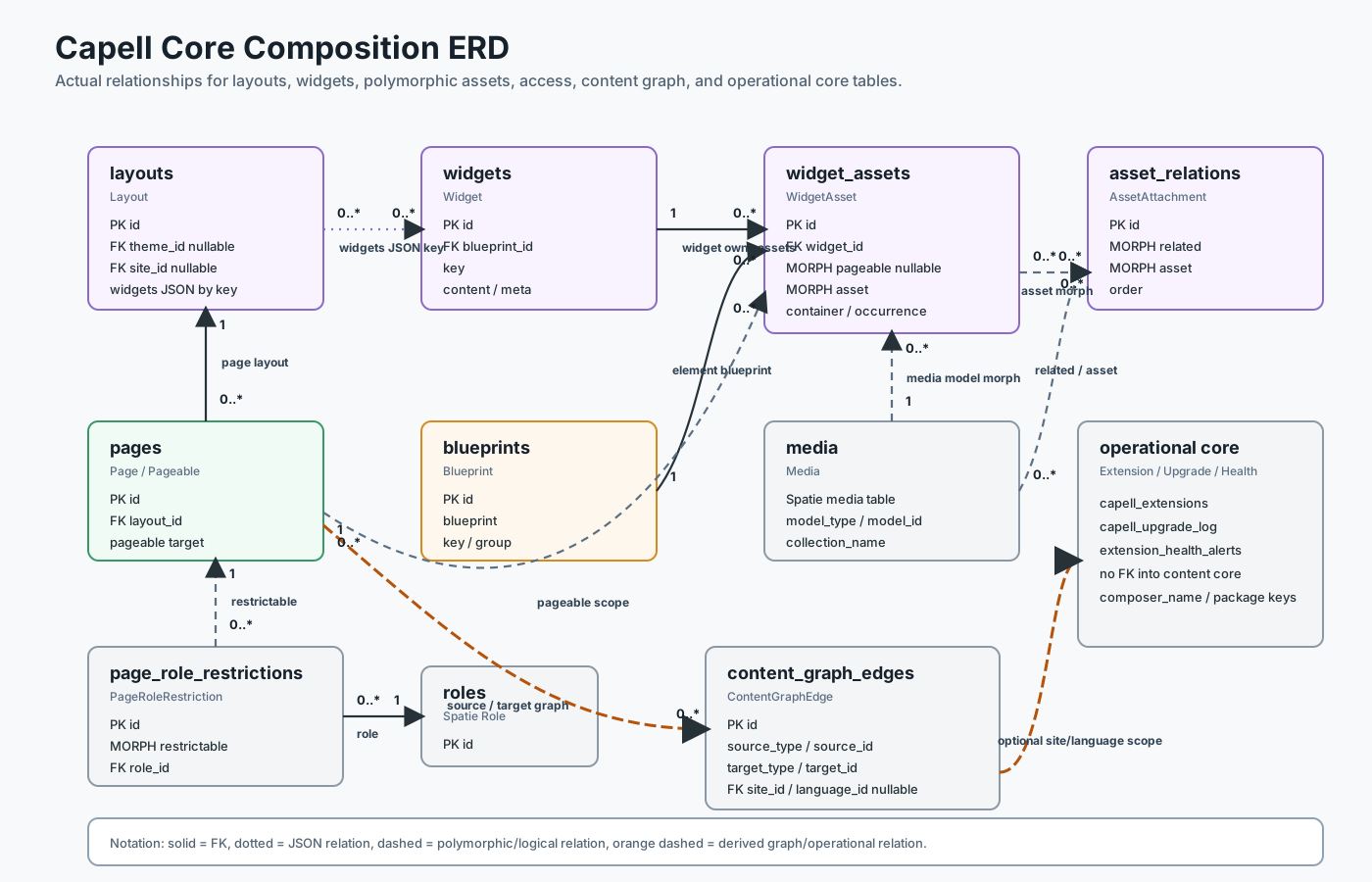
These diagrams are the source-of-truth architecture views for docs. Keep them exact and update them with code changes. The composition export is generated from capell-core-composition-erd.mmd. Flux-generated companion images can sit near these diagrams, but Mermaid should remain the precise reference.
Which records and lifecycle concepts belong together? The panels separate Core’s asset attachments, optional Layout Builder tables, public delivery, and authoring. An attachment’s asset relationship is polymorphic; Media is one possible target. Panels describe ownership and contracts, not runtime safety evidence.
The six composition, editing, extension, localisation, public-boundary and invalidation exports use Mermaid CLI 11.15.0, configuration embedded in each .mmd, a white background and an SVG ID matching the filename stem. For example, from the repository root:
mmdc -i docs/images/capell-core-composition-erd.mmd -o docs/images/capell-core-composition-erd.svg -b white -I capell-core-composition-erdKeep one final newline in the generated SVG for repository formatting. To check repeatability, render the same source and options to a temporary file and compare after normalising only the final newline. Inspect the image at an 838px documentation column as well as checking that rendering succeeds.
Package Boot Lifecycle
Section titled “Package Boot Lifecycle”The provider-bucket distinction is included in the canonical Core composition
diagram, generated from
capell-core-composition-erd.mmd.
The manifest buckets answer which provider code is available to the lifecycle;
RuntimeContextResolver answers which resolved context is active for the current
request or command. They are related stages, not interchangeable names.
The resolver returns console, admin, auth or frontend. The enum also defines shared; it is not a value returned by that resolver. Manifest buckets remain metadata, install, runtime, admin and frontend.
Admin Extender Resolution
Section titled “Admin Extender Resolution”flowchart LR PackageProvider["Package provider"] --> AdminBridge["AdminBridge"] PackageProvider --> TaggedExtenders["Tagged extenders"] AdminBridge --> Registrar["AdminBridgeRegistrar"] Registrar --> SurfaceRegistry["AdminSurfaceContributionRegistry"] TaggedExtenders --> Resolvers["Schema/action/table resolvers"] SurfaceRegistry --> Panel["CapellAdminPlugin"] Resolvers --> Filament["Filament resources/pages/widgets"] Panel --> FilamentFrontend Public Render And Cache
Section titled “Frontend Public Render And Cache”The public/cache and authenticated authoring paths are maintained as the
canonical public authoring/cache boundary diagram,
generated from capell-public-authoring-cache-boundary.mmd.

Marketplace Trust Flow
Section titled “Marketplace Trust Flow”sequenceDiagram participant Admin participant CMS as Capell CMS participant App as Capell App
Admin->>CMS: Start account connection CMS->>App: Create connection session App-->>Admin: Approval URL Admin->>App: Approve account/site App->>CMS: Callback with code and state CMS->>App: Exchange code App-->>CMS: Instance ID and signing secret CMS->>App: Heartbeat and install authorization requestsInstaller Browser Flow
Section titled “Installer Browser Flow”flowchart TD Open["Open /install"] --> PageData["BuildInstallerPageDataAction"] PageData --> Form["Installer form"] Form --> Validate["InstallController validates input"] Validate --> Preflight["InstallerPreflight"] Preflight --> Decision{"Blocking failure?"} Decision -->|yes| Report["Show remediation and report"] Decision -->|no| Plan["Build install plan"] Plan --> Step["RunInstallStepAction"] Step --> Progress["Cache/File progress reporters"] Progress --> More{"More steps?"} More -->|yes| Step More -->|no| Success["Success page and optional installer removal"]Public Output Safety Boundary
Section titled “Public Output Safety Boundary”The public and authoring paths are deliberately separate. The canonical source
and export are capell-public-authoring-cache-boundary.mmd
and capell-public-authoring-cache-boundary.svg.
Flux Companion Asset Plan
Section titled “Flux Companion Asset Plan”The FLUX.2 connector is intended for visual companion diagrams, not exact API references. Generate assets under docs/images/diagrams/ when the FLUX connector is authenticated:
| Asset | Use beside |
|---|---|
package-boot-lifecycle.png | Package boot lifecycle |
admin-extender-resolution.png | Admin debugging |
frontend-public-render-cache.png | Frontend debugging |
marketplace-trust-flow.png | Marketplace debugging |
installer-browser-flow.png | Installer overview |
Keep generated text minimal. Use the Mermaid diagrams for exact symbols.