
Capell Admin
Package docs status
Section titled “Package docs status”This page is generated from package source documentation in the Capell foundation repository and the checked-in manifest. Source documentation is not distribution status. Before running a Composer command, verify that the exact package and compatible 1.x release are available through public Packagist or the authenticated marketplace account.
| Field | Value |
|---|---|
| Composer package | capell-app/admin |
| Package slug | admin |
| Product group | Capell Foundation |
| Tier | free |
| Bundle | foundation |
| Runtime contexts | admin, console |
| Capell version | ^1.0 |
| Catalogue role | core |
| Release channel | Released |
| Source repository | capell-app/capell |
| Source path | packages/admin |
| Docs source | packages/admin/docs |
| Manifest | capell.json |
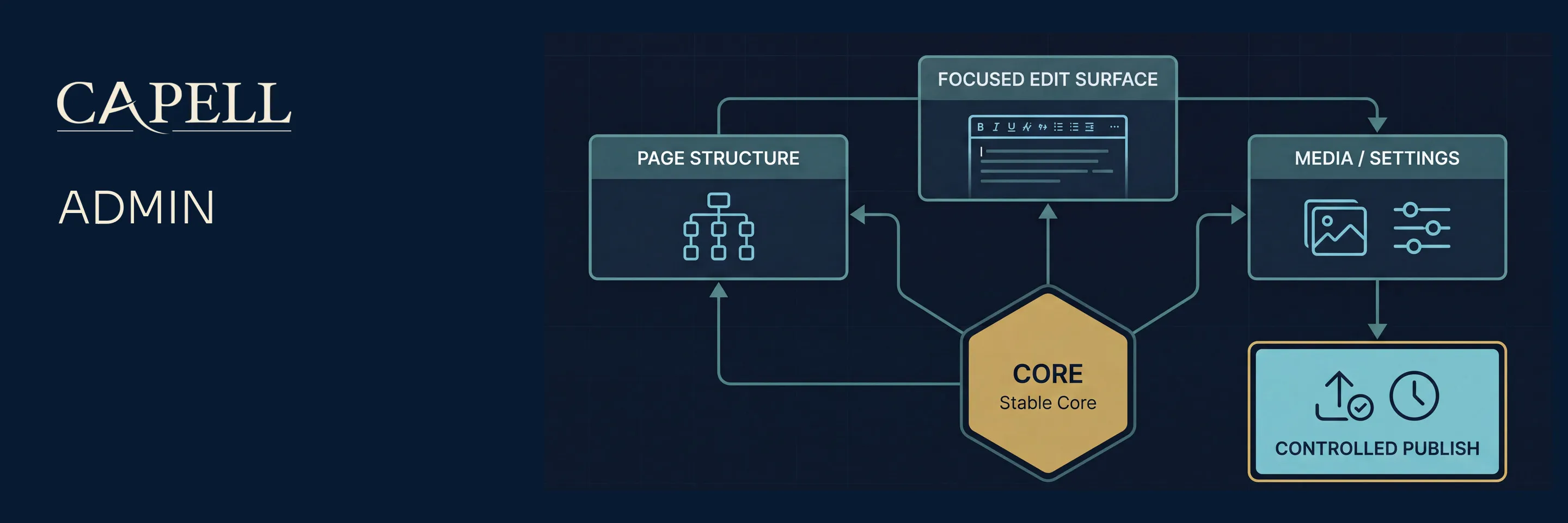






capell-app/admin is the Filament panel package for Capell CMS. It adds the authenticated editor and operator surface for managing Core records, settings, package state, dashboards, permissions, and admin extension points.
Use this package when a Capell install needs a back-office UI. It depends on capell-app/core and should not be used to render public frontend output.
Package Boundary
Section titled “Package Boundary”Admin owns:
- the Filament panel plugin, resources, pages, dashboard Filament widgets, actions, form/table components, policies, and admin routes
- editor workflows for pages, sites, languages, layouts, themes, blueprints, media, redirects, users, roles, settings, package state, and upgrades
- admin extension points for contributed resources, pages, widgets, header tools, form schemas, table queries, relation managers, and validation hooks
- admin settings migrations and admin-specific cache commands
Admin does not own:
- shared content records and migrations; those are Core records
- public request handling or public HTML safety; that is Frontend and frontend add-ons
- marketplace account linking and catalogue install authorization; that is Marketplace
- migration/import execution; Admin can expose a recovery shell, but the recovery implementation is package-owned
- heavy import handlers; packages register visible import menu entries through
ImportEntryRegistryand own the execution behind those entries
Install
Section titled “Install”Admin depends on capell-app/core and is optional. The recommended path is the installer (composer require capell-app/installer → php artisan capell:install), which adds Admin when you select it. To add it manually to an existing Capell app:
composer require capell-app/adminphp artisan capell:admin-installphp artisan capell:admin-setupThe full foundation installer may call Admin setup for you. On existing apps, use:
php artisan capell:admin-upgradephp artisan capell:admin-clear-cacheThe admin entrypoint is controlled by CAPELL_ADMIN_PATH; CAPELL_ADMIN_DOMAIN can move the panel to a dedicated host. Clear config cache after changing either value.
Runtime Surfaces
Section titled “Runtime Surfaces”- Provider:
Capell\Admin\Providers\AdminServiceProvider - Config:
config/capell-admin.php - Entrypoint helper:
Capell\Admin\Support\AdminPanelEntrypoint - Routes:
routes/web.php - Main resources:
ActivityResource,BlueprintResource,LanguageResource,LayoutResource,MediaResource,PageResource,PageUrlResource,RedirectResource,SiteResource,ThemeResource,UserResource - Main pages:
ExtensionsPage,SettingsPage,SiteHealthPage,SitemapPage,UpgradePage - Main commands:
capell:admin-install,capell:admin-setup,capell:admin-upgrade,capell:admin-clear-cache,capell:admin-cache-widgets,capell:admin-cache-configurators
ActivityResource includes a detail view that expands nested JSON changes into readable before-and-after rows for audit review.
Admin routes include a signed theme preview route and authenticated internal API routes under the configured admin path. Theme preview URLs are temporary admin URLs with signed middleware, site access checks, and no-store response headers; do not embed them into public output, cached HTML, or long-lived editor content.
Extension Points
Section titled “Extension Points”Use the documented extension points instead of extending Filament resources directly:
| Need | Extension point |
|---|---|
| Contribute a resource or page | CapellAdmin::contributeToAdminSurface(...) |
| Register a dashboard Filament widget | CapellAdmin::registerDashboardFilamentWidget(...) |
| Add page form fields | PageSchemaExtender::TAG |
| Add site form fields | SiteSchemaExtender::TAG |
| Add admin toolbar actions | AdminToolItem::TAG |
| Adjust tables, edit pages, exports, or relation managers | the matching tagged extender interface |
| Add settings UI | SettingsSchemaRegistry::register() from the owning package |
Read-only save consequences
Section titled “Read-only save consequences”Implement Capell\Admin\Contracts\EditorImpact\EditorImpactConsequencePlanner
and tag the implementation with its TAG to contribute typed
EditorImpactConsequenceData to the existing Media and Layout impact previews
and the Page editor’s on-demand Content impact before save action.
Core does not import optional cache or search packages. The host or package
adapter resolves the real work and supplies translated labels, exact scoped
counts, bounded URL examples and, when measurable, an approximate duration and
its basis. The adapter must restrict affected surfaces to the current actor’s
accessible sites, perform no writes and dispatch no work.
Consequences are informational and excluded from existing save-validation fingerprints and reconciliation surface keys. Opening the Page preview is the only action needed to compute its consequences; typing and autosave do not compute them. Media and Layout retain their existing render cadence.
Normal extension work should use the extenders and registries above. The advanced php artisan capell:admin-publish-resources [--type=<group>] [--resource=<label-or-class>] [--force] command publishes registered admin resources into the host application for direct customization. Published copies become host-maintained and can drift from package updates.
Data And Permissions
Section titled “Data And Permissions”Admin operates mostly on Core models. Admin-owned persistence is limited to settings migrations and admin-specific operational state.
Policy and permission behavior must be registered globally, not only through a Filament resource. Marketplace contributes additional permission-aware surfaces when it is installed.
All editor-facing labels, notifications, and validation messages should use package translation files. Prefer Filament label method overrides over static label properties.
Verification
Section titled “Verification”From the split repository root, with development dependencies installed, run Admin package tests after changing resources, policies, settings schemas, or panel registration:
vendor/bin/pest testsFor resource or schema changes, include the matching focused test file first. For UI behavior, verify the real Filament panel with a disposable admin account rather than stopping at the login screen.
Requirements And Support Policy
Section titled “Requirements And Support Policy”| Surface | Supported versions |
|---|---|
| PHP | ^8.4 |
| Laravel | ^13.0 |
| Filament | ^5.7.6 |
| Core | The same release as this package |
Each Capell 1.x minor receives security fixes for 24 months from its release date, and the latest 1.x minor is always supported. Upgrade all installed Capell foundation packages together to the same supported release before requesting a fix. See the Capell security policy for vulnerability reporting.
Support covers the dependency ranges above. When an upstream release reaches its own end of life earlier, upgrading that dependency may be required to receive a safe fix.
Troubleshooting
Section titled “Troubleshooting”- Missing navigation usually means the resource/page contribution was not registered, a permission blocks it, or the package cache is stale.
- Missing fields in an editor form should be checked at the tagged extender and settings schema level before editing first-party resources.
- If Admin appears on the wrong host or path, check
CAPELL_ADMIN_PATH,CAPELL_ADMIN_DOMAIN, and cached config. - If theme preview stops working after an entrypoint change, regenerate preview links against the current admin host/path; signed URLs are host/path-sensitive.
- If cache commands do not affect newly added blocks or configurators, confirm the package registered its block/configurator classes and rerun the matching admin cache command.
Development
Section titled “Development”Package development and coordinated verification happen in the capell-app/capell monorepo. Split package repositories are release mirrors; use docs.capell.app for cross-package guidance. See the contribution guide, security policy, and licence.
Further Reading
Section titled “Further Reading”| Page | Covers |
|---|---|
| Admin overview | Admin responsibilities and the package docs index. |
| Admin multi-language | Admin language records, translations, and user preferences. |
| Admin tool registry | Header tools and admin utility actions. |
| Dashboard Filament widget customization | Registering and overriding dashboard Filament widgets. |
| Marketing dashboard contributions | Contributing editor-focused marketing actions and widgets. |
| Event registry | Admin lifecycle event subscriptions. |
| Permissions and approval | Role and approval rules around publishing. |
| Resource registration | Contributed resources and admin surface lookup. |
| Schema hooks | Extending admin form schemas. |
| Settings schema registry | Package settings in the admin settings surface. |
| User menu registry | User menu item registration. |
| User resource customization | User form fields, panels, relation managers, and bridges. |
The complete admin, extension, and troubleshooting guides are published at docs.capell.app.