
Automation Studio
Package docs status
Section titled “Package docs status”This page is generated from package source documentation in the Capell packages repository and the checked-in manifest. Source documentation is not distribution status. Before running a Composer command, verify that the exact package and compatible 1.x release are available through public Packagist or the authenticated marketplace account.
| Field | Value |
|---|---|
| Composer package | capell-app/automation-studio |
| Package slug | automation-studio |
| Product group | Capell Automation |
| Tier | premium |
| Bundle | automation |
| Runtime contexts | admin, console |
| Capell version | ^1.0 |
| Catalogue role | extension |
| Release channel | Beta |
| Source repository | capell-app/packages |
| Source path | packages/automation-studio |
| Docs source | packages/automation-studio/docs |
| Manifest | capell.json |
What This Plugin Adds
Section titled “What This Plugin Adds”Automation Studio is an Available, Schema-owning Capell package in the Capell Automation product group. It ships as capell-app/automation-studio and extends these surfaces: admin, console.
Automation Studio stores rule-based workflows that match Capell package events to registered native actions, Public Actions, or agent capabilities.
Operators create and pause rules, dry-run them before use, and inspect or replay recorded automation runs from the admin.
Status details:
- Status: Available
- Tier: premium
- Bundle: automation
- Composer package:
capell-app/automation-studio - Namespace:
Capell\AutomationStudio - Theme key: not applicable
Why It Matters
Section titled “Why It Matters”For developers: Trigger and action registries let packages add workflow boundaries without coupling Automation Studio to their internal classes, and Actions own dispatch, persistence, recovery, and replay.
For teams: Teams can automate repeatable responses to package events and use run history to see whether each rule completed or failed.
Screens And Workflow
Section titled “Screens And Workflow”Screenshot contract: docs/screenshots.json.
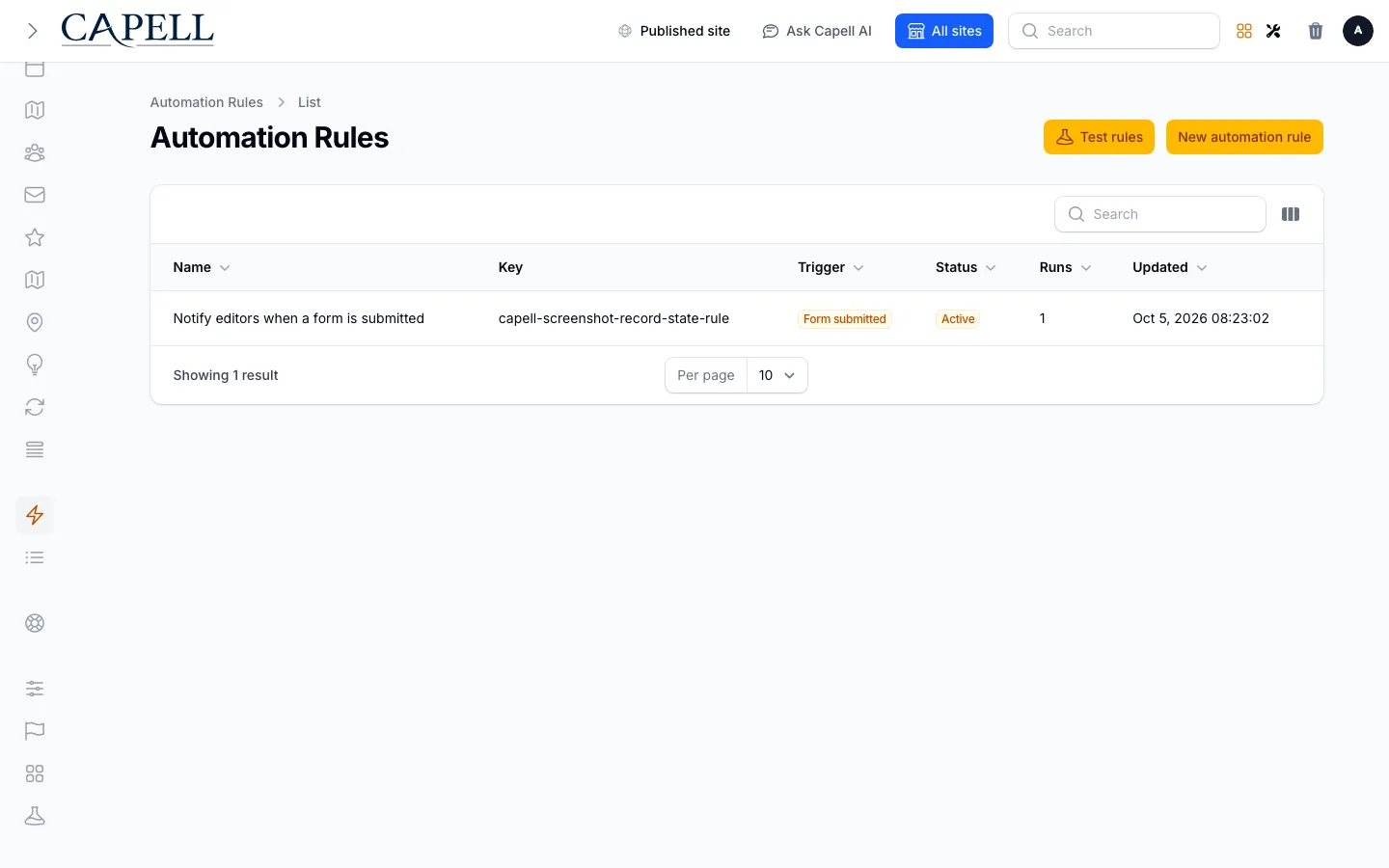
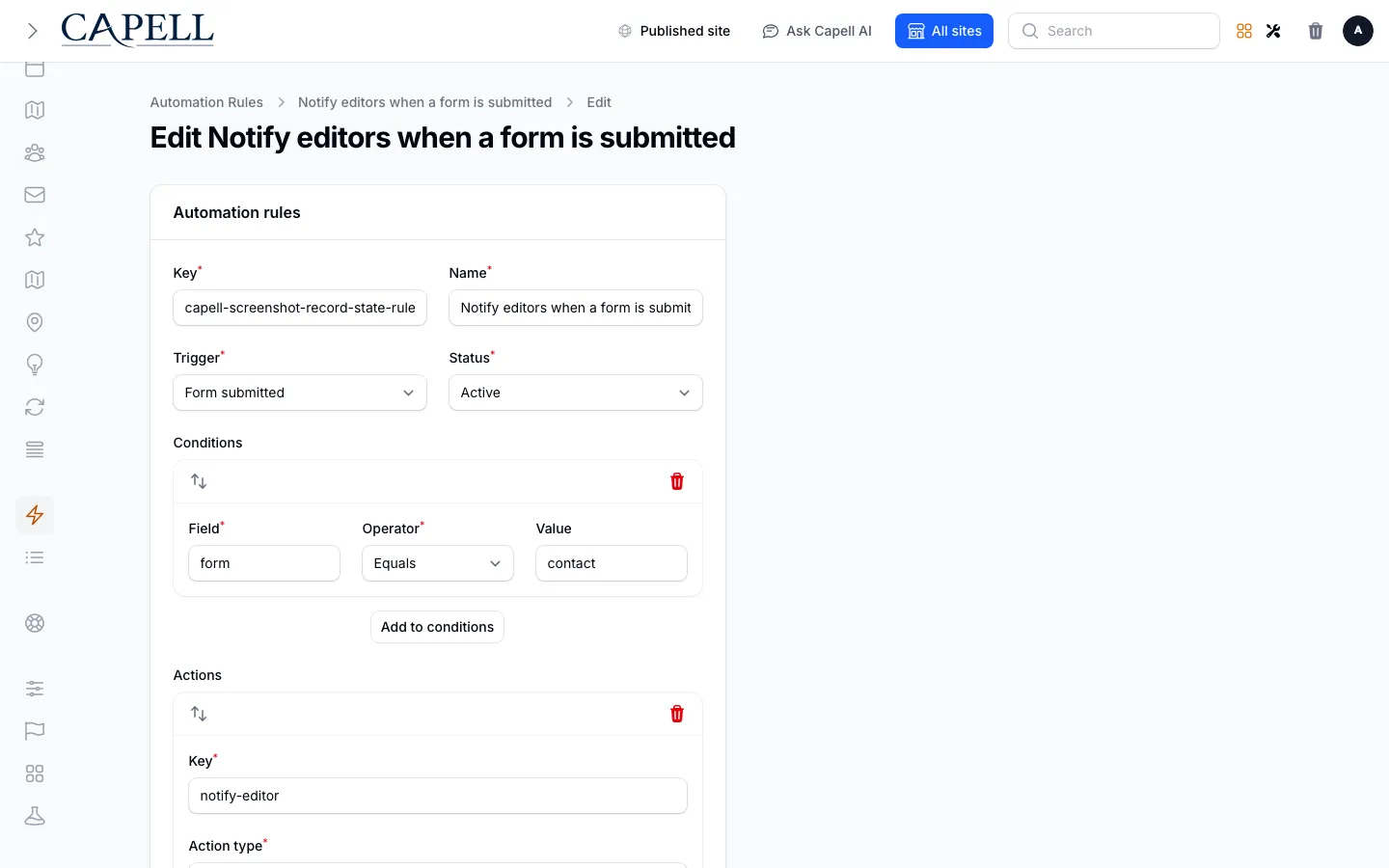
- Automation rules admin index (admin, required evidence).
- Automation rule edit screen (admin, required evidence).
- Automation runs admin index (admin, required evidence).
- Automation rule trigger and action builder (admin, supplementary evidence).
- Automation rules admin index with admin sidebar menu open (admin, supplementary evidence).
Technical Shape
Section titled “Technical Shape”Service providers
Section titled “Service providers”Capell\AutomationStudio\Providers\AutomationStudioServiceProviderCapell\AutomationStudio\Providers\AdminServiceProvider
Config files
Section titled “Config files”packages/automation-studio/config/capell-automation-studio.php
Migrations
Section titled “Migrations”packages/automation-studio/database/migrations/2026_05_31_170000_01_create_automation_rules_table.phppackages/automation-studio/database/migrations/2026_05_31_170000_02_create_automation_runs_table.php
Models
Section titled “Models”AutomationRuleAutomationRun
Filament classes
Section titled “Filament classes”AutomationRuleResourceCreateAutomationRuleEditAutomationRuleListAutomationRulesAutomationRunResourceListAutomationRuns
Policies
Section titled “Policies”AbstractAutomationStudioResourcePolicyAutomationRulePolicyAutomationRunPolicy
Extension contracts
Section titled “Extension contracts”AutomationActionHandler
Listeners
Section titled “Listeners”DispatchAutomationFromAccessApprovalDispatchAutomationFromCampaignConversionDispatchAutomationFromFormSubmissionDispatchAutomationFromWorkspaceStateChanged
Actions
Section titled “Actions”BuildAutomationRecoveryStatusActionBuildSafeAutomationActionFailureResultActionDispatchAutomationTriggerActionDryRunAutomationRulesActionLoadPersistedAutomationRulesActionPersistAutomationTriggerResultsActionQueueAutomationTriggerActionReapStaleAutomationRunsActionRecordAutomationRunActionRegisterAutomationStudioDefaultsActionReplayAutomationRunActionSeedAutomationStudioScreenshotFixtureAction
Data objects
Section titled “Data objects”AutomationActionDefinitionDataAutomationActionResultDataAutomationRecoveryStatusDataAutomationRuleActionDataAutomationRuleConditionDataAutomationRuleDataAutomationRuleDryRunResultDataAutomationTriggerDefinitionDataAutomationTriggerEventData
DispatchQueuedAutomationTriggerJob
Manifest action API
Section titled “Manifest action API”dispatchAutomationTrigger: Capell\AutomationStudio\Actions\DispatchAutomationTriggerActiondryRunAutomationRules: Capell\AutomationStudio\Actions\DryRunAutomationRulesActionloadPersistedAutomationRules: Capell\AutomationStudio\Actions\LoadPersistedAutomationRulesActionpersistAutomationTriggerResults: Capell\AutomationStudio\Actions\PersistAutomationTriggerResultsActionqueueAutomationTrigger: Capell\AutomationStudio\Actions\QueueAutomationTriggerActionreapStaleAutomationRuns: Capell\AutomationStudio\Actions\ReapStaleAutomationRunsActionrecordAutomationRun: Capell\AutomationStudio\Actions\RecordAutomationRunActionregisterAutomationStudioDefaults: Capell\AutomationStudio\Actions\RegisterAutomationStudioDefaultsActionreplayAutomationRun: Capell\AutomationStudio\Actions\ReplayAutomationRunAction
Scheduled commands
Section titled “Scheduled commands”capell:automation-studio:reap-stale (everyTenMinutes; manifest declared)
Console command classes
Section titled “Console command classes”ReapStaleAutomationRunsCommandSeedAutomationStudioScreenshotFixtureCommand
Manifest contributions
Section titled “Manifest contributions”admin-resource: Capell\AutomationStudio\Manifest\AutomationRuleResourceContributionadmin-resource: Capell\AutomationStudio\Manifest\AutomationRunResourceContributionmodel: Capell\AutomationStudio\Manifest\AutomationStudioModelsContributionscheduled-job: Capell\AutomationStudio\Manifest\AutomationStudioRecoveryScheduleContribution
Health checks
Section titled “Health checks”Capell\AutomationStudio\Health\AutomationStudioHealthCheck
Cache tags
Section titled “Cache tags”automation-studio
Data Model
Section titled “Data Model”- Required tables:
automation_rules,automation_runs. - Models:
AutomationRule,AutomationRun. - Core record references in migrations:
sites via site_id. - Migration files:
2026_05_31_170000_01_create_automation_rules_table.php,2026_05_31_170000_02_create_automation_runs_table.php. - Migration impact: run host migrations through the package install flow before opening package surfaces.
- Deletion/retention behaviour: migrations declare cascade-on-delete relationships and null-on-delete relationships; no timed pruning or retention schedule is declared in
capell.json.
Install Impact
Section titled “Install Impact”- Required packages:
capell-app/admin,capell-app/core. - Admin navigation: declares
admin-resource: AutomationRuleResourceContribution,admin-resource: AutomationRunResourceContribution; each Filament page or resource controls its own navigation visibility. - Admin/editor extensions: none declared.
- Permissions:
View:AutomationRule,Create:AutomationRule,Update:AutomationRule,Delete:AutomationRule,View:AutomationRun,Update:AutomationRun; access also governed by package policies:AbstractAutomationStudioResourcePolicy,AutomationRulePolicy,AutomationRunPolicy. - Public routes: none declared.
- Database changes: package migrations are declared.
- Config:
config/capell-automation-studio.php. - Settings: no package settings declared.
- Queues or schedules: scheduled commands
capell:automation-studio:reap-stale (everyTenMinutes; manifest declared); queue jobsDispatchQueuedAutomationTriggerJob. - Cache tags:
automation-studio. - Commands: console command classes detected:
ReapStaleAutomationRunsCommand,SeedAutomationStudioScreenshotFixtureCommand.
Common Pitfalls
Section titled “Common Pitfalls”- Keep required Capell packages on compatible v4 releases:
capell-app/admin,capell-app/core. - Run migrations before opening package resources or public routes.
- Review package configuration before production-like verification:
config/capell-automation-studio.php. - Keep the host Laravel scheduler running so package-registered schedules can execute:
capell:automation-studio:reap-stale (everyTenMinutes; manifest declared). - Custom write integrations must preserve invalidation for
automation-studiocache tags.
Troubleshooting
Section titled “Troubleshooting”| Symptom | Likely cause | Check | Fix |
|---|---|---|---|
| Package surface is missing after install | Provider or manifest is not loaded | Confirm capell.json, package composer.json, and provider registration | Reinstall the package, refresh Composer autoload, and clear host caches |
| Admin screen or command fails on missing table | Package migrations have not run | Check the tables listed in Data Model | Run host migrations and rerun the focused package test |
| Background work does not run | Queue worker or declared schedule is not active | Check the jobs and scheduled commands listed in Technical Shape | Start the queue worker or host scheduler, then run the focused command or package test |
Quick Start
Section titled “Quick Start”- Install the package:
composer require capell-app/automation-studio. - Open the package admin surface at
/admin/automation-studio/automation-rulesand confirm Automation Studio is available.
Next Steps
Section titled “Next Steps”- Package docs
- Overview
- Worked extension examples
- Admin guide
- Configuration files:
config/capell-automation-studio.php. - Troubleshooting
- Screenshot contract
- Marketplace assets
- Capell content language plan
- Capell documentation design system
- Capell and package ERD notes
- Related packages: Access Gate, Agent Bridge, Campaign Studio, Contacts, Email Studio, Form Builder, Newsletter, Public Actions, Publishing Studio.