
Search
Package docs status
Section titled “Package docs status”This page is generated from package source documentation in the Capell packages repository and the checked-in manifest. Source documentation is not distribution status. Before running a Composer command, verify that the exact package and compatible 1.x release are available through public Packagist or the authenticated marketplace account.
| Field | Value |
|---|---|
| Composer package | capell-app/search |
| Package slug | search |
| Product group | Capell Search & SEO |
| Tier | paid |
| Bundle | search-seo |
| Runtime contexts | admin, frontend, console |
| Capell version | ^1.0 |
| Catalogue role | extension |
| Release channel | Beta |
| Source repository | capell-app/search |
| Docs source | packages/search/docs |
| Manifest | capell.json |
On your site, a visitor who types “tee” can land on your T-shirt page first, because you decide that on the Search settings page. Synonyms, typo fixes and promoted results are all set there.
The search button sits in your site header and opens a box that shows matching pages as the visitor types. A results page lists the rest with the matching words highlighted. The button appears only if your theme uses the header from the Navigation package. Turning off the Enable search setting makes search disappear from the site altogether, including the header button and the results page. To hide only the button, turn off Show header search.
Search reads the list of your public pages that Discovery Foundation keeps, so there’s no separate search index to build and an edit shows on the next search. It matches the title, the address and the first 1000 characters of page text as plain text. Anything further down a long page isn’t found.
Administrators get the top, trending and zero-result searches on the admin dashboard, all taken from the results page. You see what people looked for and didn’t find.
- Price and availability: Check current availability and price on the Capell Marketplace listing.
- Licence: Check the licence terms on the Capell Marketplace listing.
- Requires:
PHP ^8.4,capell-app/admin ^1.0.66,capell-app/core ^1.0.79,capell-app/discovery-foundation ^1.0,capell-app/frontend ^1.0.79,lorisleiva/laravel-actions ^2.8,spatie/laravel-data ^4.5,spatie/laravel-package-tools ^1.14.1. - Install:
composer require capell-app/search.
Quick Start
Section titled “Quick Start”- Install the package:
composer require capell-app/search. - Open the package admin surface at
/admin/extensionsand confirm Search is available.
For Developers
Section titled “For Developers”The searchable-source registry and Search contract keep indexing backends replaceable while Actions normalise, sanitize, enhance, and record queries.
Configure
Section titled “Configure”- Configuration files:
config/capell-search.php. - Admin settings:
Capell\Search\Settings\SearchSettings. - Commands:
php artisan capell:search:screenshot-fixture,php artisan search:flush,php artisan search:index,php artisan search:purge,php artisan search:rehash-logs.
Limits And Pitfalls
Section titled “Limits And Pitfalls”- Install the required Capell packages at the versions in
composer.json:capell-app/admin ^1.0.66,capell-app/core ^1.0.79,capell-app/discovery-foundation ^1.0,capell-app/frontend ^1.0.79. - Run migrations before opening package resources or public routes.
- Review middleware, throttling, signatures, and public-output safety in
routes/web.phpbefore exposing routes. - Keep the host Laravel scheduler running so package-registered schedules can execute:
search:purge (monthly; package registered). - Keep public Blade and cached HTML free of authoring markers, model IDs, permissions, signed editor URLs, and lazy database queries.
- Custom write integrations must preserve invalidation for
searchcache tags.
Screens And Workflow
Section titled “Screens And Workflow”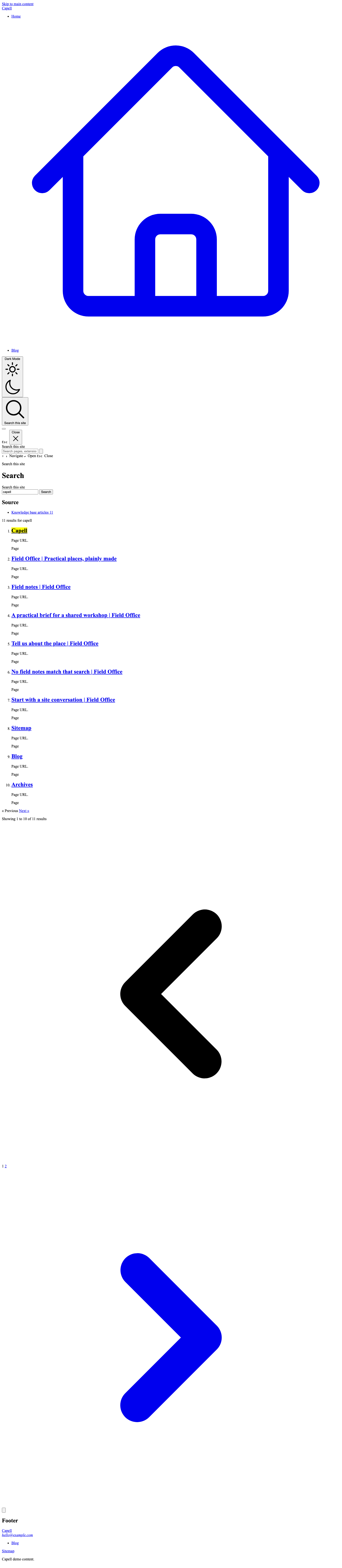

- Frontend search results page (frontend).
- Header search field (frontend).
- Top searches widget (admin).
- Trending searches widget (admin).
- Zero-result searches widget (admin).
- Site search settings screen (admin).
- Native Search curation settings (admin).
Install Impact
Section titled “Install Impact”- Required packages:
capell-app/admin,capell-app/core,capell-app/discovery-foundation,capell-app/frontend. - Admin navigation: declares
admin-page: SearchSettingsPageContribution; each Filament page or resource controls its own navigation visibility. - Admin/editor extensions:
dashboard-widget: TopSearchesWidgetContribution,dashboard-widget: TrendingSearchesWidgetContribution,dashboard-widget: ZeroResultSearchesWidgetContribution,overview-stat: SearchOverviewStatsContribution. - Permissions: Shield-generated page permissions for
Capell\Search\Filament\Pages\SearchSettingsPage(names and grants depend on host Shield configuration). - Public routes: loads
routes/web.php; registersSearchFrontendRouteContribution. - Database changes: package migrations are declared.
- Config:
config/capell-search.php. - Settings:
Capell\Search\Settings\SearchSettings. - Queues or schedules: scheduled commands
search:purge (monthly; package registered). - Cache tags:
search. - Commands:
capell:search:screenshot-fixture,search:flush,search:index,search:purge,search:rehash-logs.
Troubleshooting
Section titled “Troubleshooting”| Symptom | Likely cause | Check | Fix |
|---|---|---|---|
| Package surface is missing after install | Provider or manifest is not loaded | Confirm capell.json, package composer.json, and provider registration | Reinstall the package, refresh Composer autoload, and clear host caches |
| Admin screen or command fails on missing table | Package migrations have not run | Check the tables listed in Data Model | Run host migrations and rerun the focused package test |
| Route returns unexpected output | Route cache, middleware, or signed URL setup does not match the package route file | Check the route files listed in Technical Shape | Clear route cache and verify middleware before exposing public routes |
| Background work does not run | Queue worker or declared schedule is not active | Check the jobs and scheduled commands listed in Technical Shape | Start the queue worker or host scheduler, then run the focused command or package test |
| Public output leaks unexpected state | Render data, cache variation, or authoring boundary has regressed | Check public Blade, cache tags, and public-output safety tests | Move data loading out of Blade and rerun the package public-output tests |
Upgrading
Section titled “Upgrading”No manual steps between minor versions.
Read CHANGELOG.md before upgrading.
Next Steps
Section titled “Next Steps”- Package docs
- Overview
- Worked extension examples
- Admin guide
- Configuration files:
config/capell-search.php. - Troubleshooting
- Developer reference
- Marketplace assets
- Capell content language plan
- Capell documentation design system
- Capell and package ERD notes
- Related packages: Discovery Foundation, SEO Checks, Site Discovery, Redirects.