
GA4 Reports
Package docs status
Section titled “Package docs status”This page is generated from package source documentation in the Capell packages repository and the checked-in manifest. Source documentation is not distribution status. Before running a Composer command, verify that the exact package and compatible 1.x release are available through public Packagist or the authenticated marketplace account.
| Field | Value |
|---|---|
| Composer package | capell-app/ga4-reports |
| Package slug | ga4-reports |
| Product group | Capell Marketing & Growth |
| Tier | paid |
| Bundle | marketing-growth |
| Runtime contexts | admin, console |
| Capell version | ^1.0 |
| Catalogue role | extension |
| Release channel | Beta |
| Docs source | packages/ga4-reports/docs |
| Manifest | capell.json |
Your Capell admin gets a Google Analytics page with overview figures, a traffic trend and a table of your most-viewed pages. You can answer a colleague without opening another site. It reads from a Google Analytics 4 property that already collects data from your site.
It also needs a key file for a Google service account with read access. Your developer or host saves that file on the server, and you enter its path in settings. Refreshing the figures needs background jobs running on your server.
Super Admins see the page and can give other administrators access. The same cards can sit on the main dashboard, and neither shows on your public pages. The overview says how many days of the period have been imported so far.
The figures are a copy of finished days up to yesterday, refreshed overnight by default. A button on the page fetches the latest on request, and a note shows when the last refresh finished and what went wrong if one failed. The overview then gives you page views, sessions and engagement for this week.
- Price and availability: Check current availability and price on the Capell Marketplace listing.
- Licence: Check the licence terms on the Capell Marketplace listing.
- Requires:
PHP ^8.4,capell-app/admin ^1.0.78,capell-app/core ^1.0.75,lorisleiva/laravel-actions ^2.8,spatie/laravel-data ^4.5,spatie/laravel-package-tools ^1.14.1. - Install:
composer require capell-app/ga4-reports.
Quick Start
Section titled “Quick Start”- Install the package:
composer require capell-app/ga4-reports. - Open the package admin surface at
/admin/ga4-reportsand confirm GA4 Reports is available.
For Developers
Section titled “For Developers”A replaceable data-client contract and focused sync and report Actions keep external API calls off the admin render path.
Configure
Section titled “Configure”- Configuration files:
config/capell-ga4-reports.php. - Admin settings:
Capell\GA4Reports\Settings\GA4ReportsSettings. - Commands:
php artisan capell:ga4-reports-doctor,php artisan capell:ga4-reports-prune,php artisan capell:ga4-reports-sync,php artisan ga4-reports:sync.
Limits And Pitfalls
Section titled “Limits And Pitfalls”- Install the required Capell packages at the versions in
composer.json:capell-app/admin ^1.0.78,capell-app/core ^1.0.75. - Run migrations before opening package resources or public routes.
- Keep the host Laravel scheduler running so package-registered schedules can execute:
capell:ga4-reports-prune (daily; package registered),capell:ga4-reports-sync (package registered). - Custom write integrations must preserve invalidation for
ga4-reportscache tags.
Screens And Workflow
Section titled “Screens And Workflow”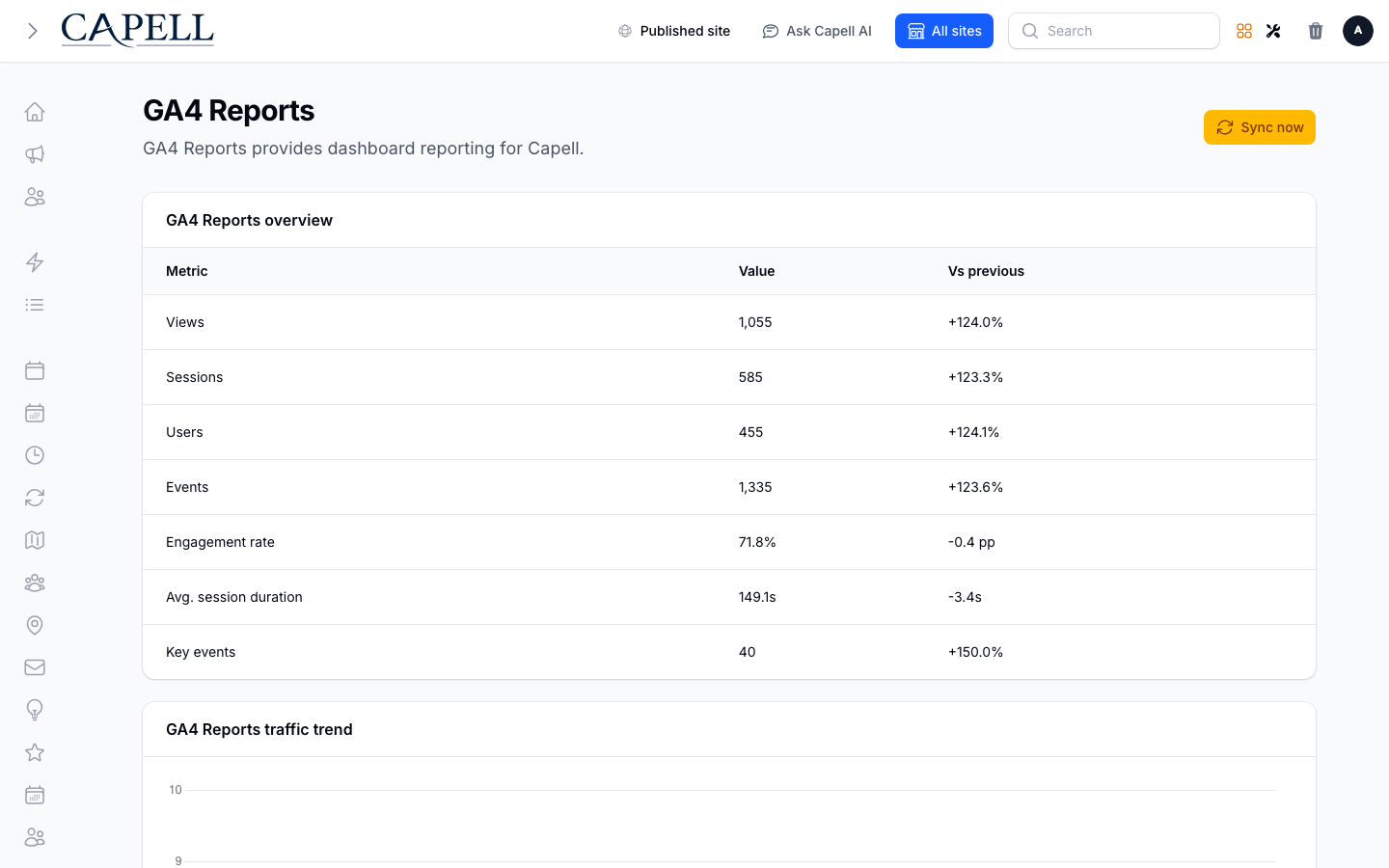
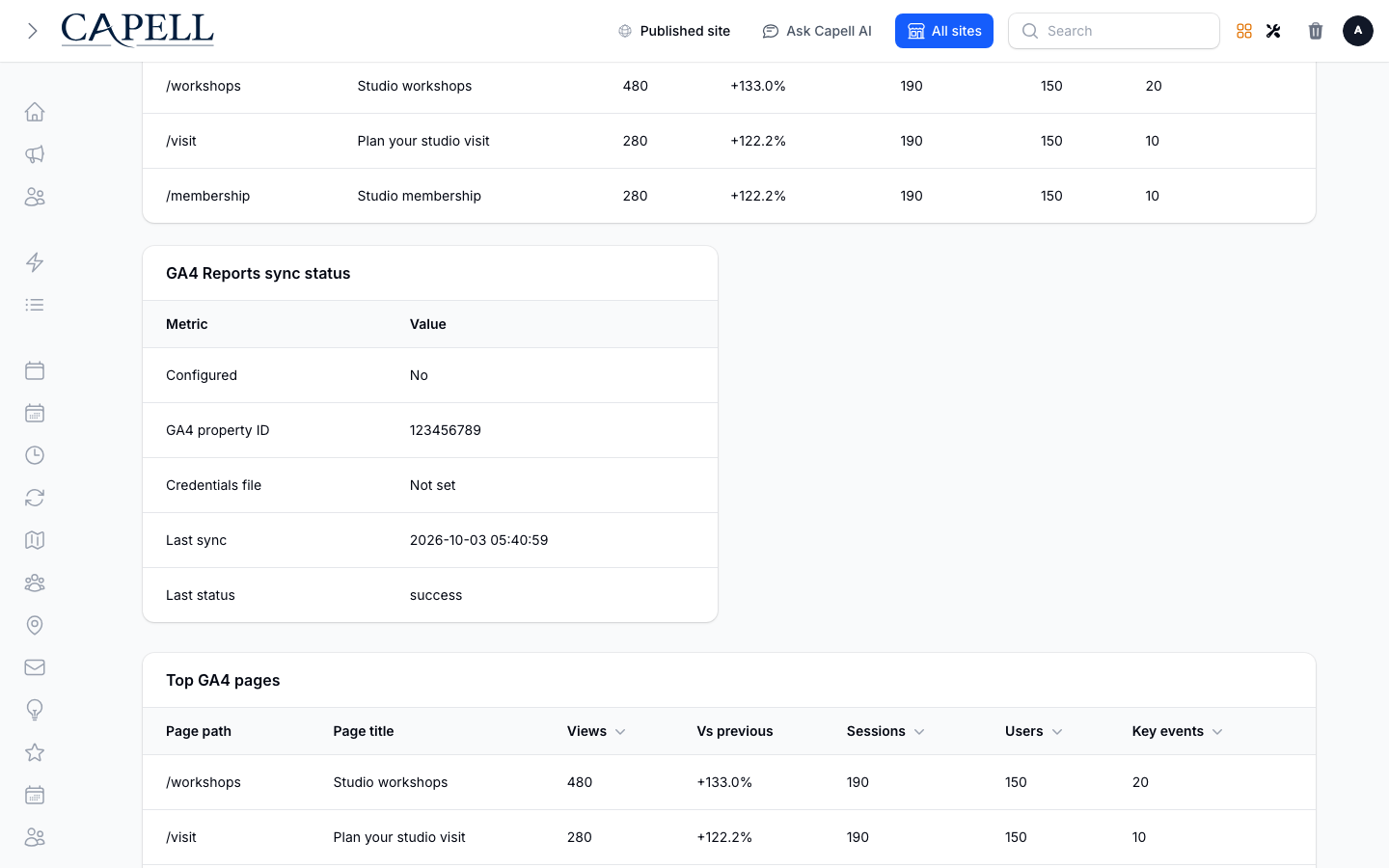
- GA4 Reports dashboard page (admin).
- GA4 Reports setup status widget (admin).
- GA4 Reports settings (admin).
- GA4 Reports top pages detail (admin).
- GA4 Reports dashboard page with admin sidebar menu open (admin).
Install Impact
Section titled “Install Impact”- Required packages:
capell-app/admin,capell-app/core. - Admin navigation: declares
admin-page: GA4ReportsAdminPageContribution; each Filament page or resource controls its own navigation visibility. - Admin/editor extensions:
dashboard-widget: GA4ReportsDashboardFilamentWidgetsContribution,overview-stat: GA4ReportsOverviewStatsContribution. - Permissions:
View:GA4ReportsPage; Shield-generated page permissions forCapell\GA4Reports\Filament\Pages\GA4ReportsPage(names and grants depend on host Shield configuration). - Public routes: none declared.
- Database changes: package migrations are declared.
- Config:
config/capell-ga4-reports.php. - Settings:
Capell\GA4Reports\Settings\GA4ReportsSettings. - Queues or schedules: scheduled commands
capell:ga4-reports-prune (daily; package registered),capell:ga4-reports-sync (package registered). - Cache tags:
ga4-reports. - Commands:
capell:ga4-reports-doctor,capell:ga4-reports-prune,capell:ga4-reports-sync,ga4-reports:sync.
Troubleshooting
Section titled “Troubleshooting”| Symptom | Likely cause | Check | Fix |
|---|---|---|---|
| Package health check reports a problem | Package configuration or runtime dependencies are not ready | Run php artisan capell:ga4-reports-doctor | Follow the reported checks, then rerun the doctor command |
| Package surface is missing after install | Provider or manifest is not loaded | Confirm capell.json, package composer.json, and provider registration | Reinstall the package, refresh Composer autoload, and clear host caches |
| Admin screen or command fails on missing table | Package migrations have not run | Check the tables listed in Data Model | Run host migrations and rerun the focused package test |
| Background work does not run | Queue worker or declared schedule is not active | Check the jobs and scheduled commands listed in Technical Shape | Start the queue worker or host scheduler, then run the focused command or package test |
Upgrading
Section titled “Upgrading”No manual steps between minor versions.
Read CHANGELOG.md before upgrading.
Next Steps
Section titled “Next Steps”- Package docs
- Overview
- Worked extension examples
- Admin guide
- Configuration files:
config/capell-ga4-reports.php. - Troubleshooting
- Developer reference
- Marketplace assets
- Capell content language plan
- Capell documentation design system
- Capell and package ERD notes