
Mail Log
Package docs status
Section titled “Package docs status”This page is generated from package source documentation in the Capell packages repository and the checked-in manifest. Source documentation is not distribution status. Before running a Composer command, verify that the exact package and compatible 1.x release are available through public Packagist or the authenticated marketplace account.
| Field | Value |
|---|---|
| Composer package | capell-app/mail-log |
| Package slug | mail-log |
| Product group | Capell Operations |
| Tier | free |
| Bundle | operations |
| Runtime contexts | admin |
| Capell version | ^1.0 |
| Catalogue role | extension |
| Release channel | Beta |
| Docs source | packages/mail-log/docs |
| Manifest | capell.json |
Someone tells you the password reset never arrived, and you need to know if your site sent it. This keeps a record of every email the site sends, so you can look it up in the admin and see what happened to it.
Each email gets a line with its subject, the part of the site that sent it, the time and how far it got. If your developer connects Postmark delivery reports, you also see if each email was delivered, bounced or marked as spam. A bounce shows its reason. When an email fails before it leaves your server, the reason is kept too.
The text of a sent email is never stored. Addresses are kept only as a code, so the list never shows who an email went to. Messages the circuit breaker holds back are kept encrypted until an administrator decides. You can still find every email sent to one person by typing their full address into the filter, and a privacy request for that person exports or deletes their entries.
Only global administrators with the right permission can open the list, which is read-only. Entries are kept for 90 days by default. Change that in the settings. Old entries are removed by a daily clean-up, which needs the scheduler running on your server.
- Price and availability: Check current availability and price on the Capell Marketplace listing.
- Licence: Check the licence terms on the Capell Marketplace listing.
- Requires:
PHP ^8.4,capell-app/admin ^1.0.78,capell-app/core ^1.0.79,laravel/framework ^12.61.1|^13.12.0,lorisleiva/laravel-actions ^2.8,spatie/laravel-package-tools ^1.14.1,spatie/laravel-settings ^3.4. - Install:
composer require capell-app/mail-log:@beta.
Quick Start
Section titled “Quick Start”- Install the package:
composer require capell-app/mail-log:@beta. - Open the package admin page or resource and verify Mail Log is available.
For Developers
Section titled “For Developers”Listeners on Laravel’s MessageSending and MessageSent events record every message with keyed recipient hashes and no body, queue and transport failures close unconfirmed rows, and Postmark webhooks arrive through Core’s deduplicating receiver behind Basic-auth credentials.
Configure
Section titled “Configure”- Configuration files:
config/mail-log.php. - Admin settings:
Capell\MailLog\Settings\MailLogSettings. - Commands:
php artisan capell:mail-log-breaker-baselines,php artisan capell:mail-log-discover,php artisan capell:mail-log-health,php artisan capell:mail-log-prune.
Limits And Pitfalls
Section titled “Limits And Pitfalls”- Install the required Capell packages at the versions in
composer.json:capell-app/admin ^1.0.78,capell-app/core ^1.0.79. - Run migrations before opening package resources or public routes.
- Review middleware, throttling, signatures, and public-output safety in
routes/webhooks.phpbefore exposing routes. - Keep the host Laravel scheduler running so package-registered schedules can execute:
capell:mail-log-breaker-baselines (hourly; package registered),capell:mail-log-discover (daily; package registered),capell:mail-log-health (hourly; package registered),capell:mail-log-prune (daily; package registered).
Screens And Workflow
Section titled “Screens And Workflow”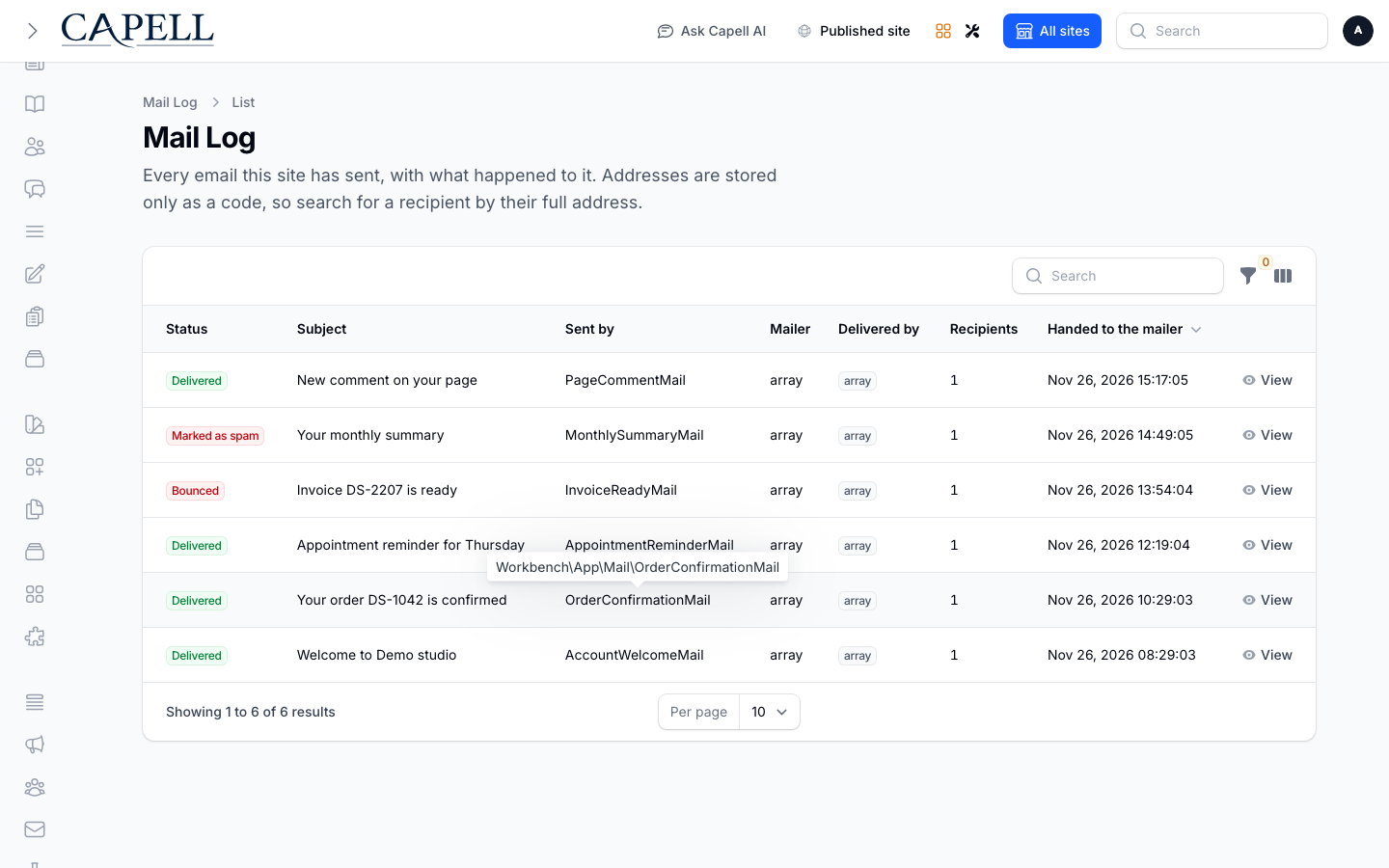
- Mail Log list showing each message’s delivery outcome (admin).
Install Impact
Section titled “Install Impact”- Required packages:
capell-app/admin,capell-app/core. - Admin navigation: declares
admin-page: MailLogAdminPageContribution,admin-resource: MailLogAdminResourcesContribution; each Filament page or resource controls its own navigation visibility. - Admin/editor extensions: none declared.
- Permissions:
View:MailLogEntry,Review:OutboundMessageSource,Manage:OutboundHeldMessage; access also governed by package policies:MailLogEntryPolicy,OutboundHeldMessagePolicy,OutboundMessageSourcePolicy. - Public routes: loads
routes/webhooks.php; registersMailLogRoutesContribution. - Database changes: package migrations are declared.
- Config:
config/mail-log.php. - Settings:
Capell\MailLog\Settings\MailLogSettings. - Queues or schedules: scheduled commands
capell:mail-log-breaker-baselines (hourly; package registered),capell:mail-log-discover (daily; package registered),capell:mail-log-health (hourly; package registered),capell:mail-log-prune (daily; package registered). - Cache tags: none declared.
- Commands:
capell:mail-log-breaker-baselines,capell:mail-log-discover,capell:mail-log-health,capell:mail-log-prune.
Troubleshooting
Section titled “Troubleshooting”| Symptom | Likely cause | Check | Fix |
|---|---|---|---|
| Package surface is missing after install | Provider or manifest is not loaded | Confirm capell.json, package composer.json, and provider registration | Reinstall the package, refresh Composer autoload, and clear host caches |
| Admin screen or command fails on missing table | Package migrations have not run | Check the tables listed in Data Model | Run host migrations and rerun the focused package test |
| Route returns unexpected output | Route cache, middleware, or signed URL setup does not match the package route file | Check the route files listed in Technical Shape | Clear route cache and verify middleware before exposing public routes |
| Background work does not run | Queue worker or declared schedule is not active | Check the jobs and scheduled commands listed in Technical Shape | Start the queue worker or host scheduler, then run the focused command or package test |
Upgrading
Section titled “Upgrading”No manual steps between minor versions.
Read CHANGELOG.md before upgrading.
Next Steps
Section titled “Next Steps”- Package docs
- Overview
- Worked extension examples
- Admin guide
- Configuration files:
config/mail-log.php. - Troubleshooting
- Developer reference
- Capell content language plan
- Capell documentation design system
- Capell and package ERD notes
- Related packages: Privacy Centre, Diagnostics.